How to Revive Your Moto G56 5G
| Date | 2026-08-27 19:10:10 |
| Filesize | 5.00 GB |
| Visits | 48 |
How to Revive Your Moto G56 5G
If your Moto G56 5G is "dead" (hard-bricked) due to TSM or any other tool, don’t worry. Here is a quick and effective solution to bring it back to life.
If the computer still detects the MediaTek port when you connect the device to the PC, follow these simple steps:
Tool: Open AMT and select the Redmi 14 5G model.
Read: Go to the partition manager section and read the partition table.
LK File: Select the lk_a and lk_b partitions.
Flashing: Flash the LK.img file (you can use the one I will leave in the resources section if your version is Android 16, or download it directly from the Lolinet page—make sure to use the exact same build to avoid any issues).
Result: With this simple step, the device will turn back on immediately!
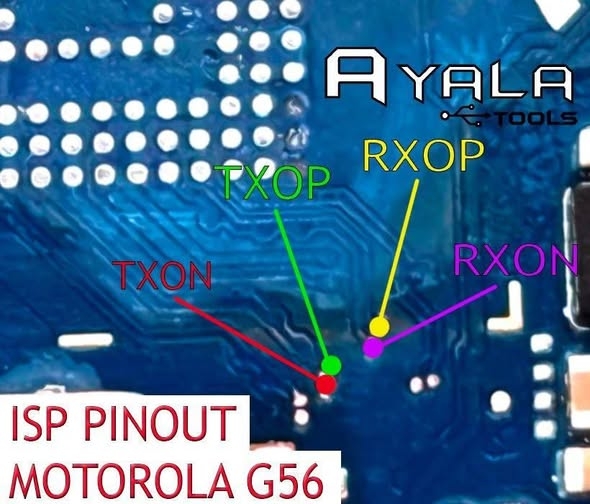
If the phone shows no signs of life and does not generate any port when connected:
Physical Connection: It will be necessary to make an ISP connection (pinout).
Flashing: Once connected to your box/dongle via ISP, perform the exact same procedure: flash only the LK partition (lk_a and lk_b), or flash the entire ROM if necessary.
Special thanks to Pandonymous's kitchen for the backup/support.
Note: If you prefer, you can build your own patch or flash your own build.